Read the Overview
Use the Overview to see one building’s energy over a period you choose: the total, the daily trend and which kinds of equipment used it, with each figure’s basis.
Steps
Step 1: Open Overview and choose a building
Choose Overview at the top of the navigation. Pick the building and the period: the last 7, 30 or 90 days, or the last twelve months.

Step 2: Read the energy used
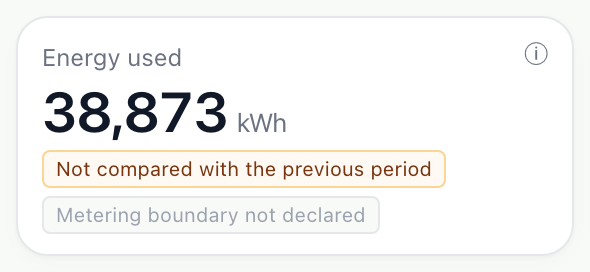
Energy used is the total over the period, compared with the period before. Its chips say what the figure covers, and the information mark beside it explains each one.
Step 3: Read the energy charts
Energy trend draws each day’s use. Energy by equipment class shows which kinds of equipment used it, how many readings it examined, and whether any were left unassigned.
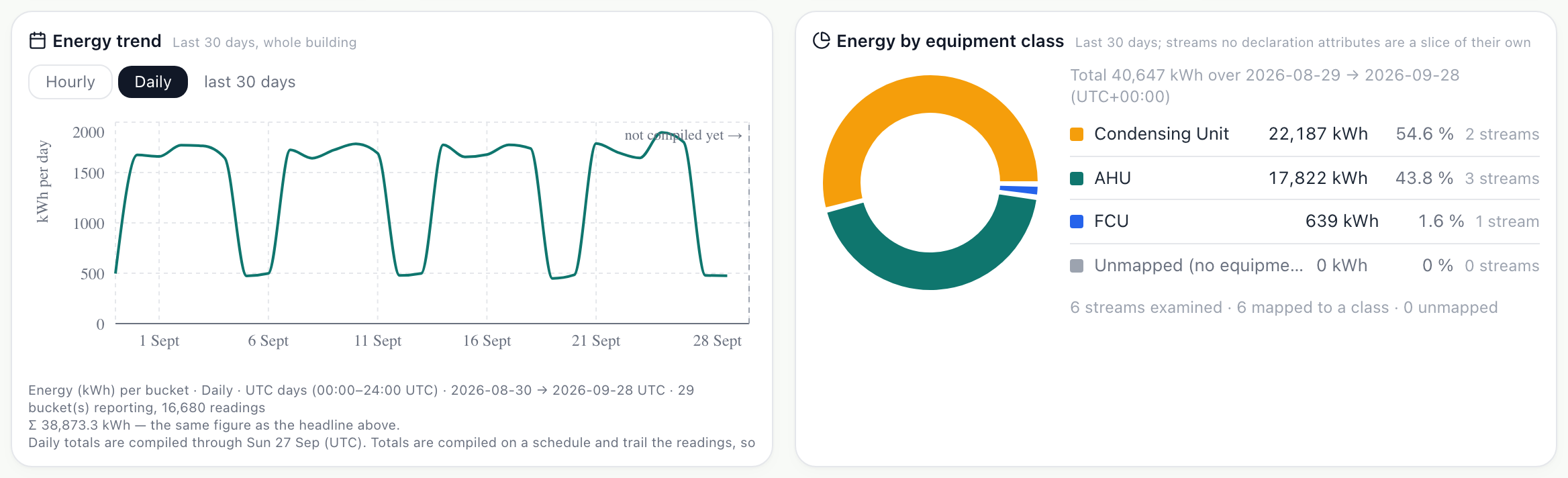
- The line under each chart states the period, the days that reported, and the total it drew.
What you’ll see
- A day with no reading is drawn as a gap, not as zero use.
- A figure with too little data behind it says so, instead of showing a number.
Troubleshooting
- A chart is empty.
- Check the period: it may begin before the building’s data does. Explorer, Coverage shows what the building holds.
- The ring chart has an unassigned slice.
- Some readings are not tied to a machine. Map them to equipment from the source’s Map channels, or add the equipment in Sites & Assets.
Last verified against Radr on 28 September 2026. Screenshots show the real product with a simulated estate; every name and reading in them is invented.
Watch live readings
Follow a building’s readings as they arrive in Live Data: the latest value from each instrument, the last day drawn as charts, and every machine with its state.
MonitoringCompare your locations
See every building at once in Locations, grouped by region, country or type and placed on a map with its energy and open alerts, then open any one for the detail.
MonitoringFind equipment on the Levels drawing
Use the Levels drawing in Site Monitor to see a building floor by floor with the units that serve each floor, then open a level or unit for its readings today.
MonitoringStuck on a step?
Tell us which guide and which step, and we will help, then fix the guide.