Turn on the daily brief
Let Radr’s assistant keep watch over your buildings and write a short brief each morning about the day before, shown on Home and emailed to your admins.
Steps
Step 1: Let the assistant keep watch
In Settings, open the Watch tab and grant the watch standing authority. Until an Admin does, it looks at nothing and writes nothing.
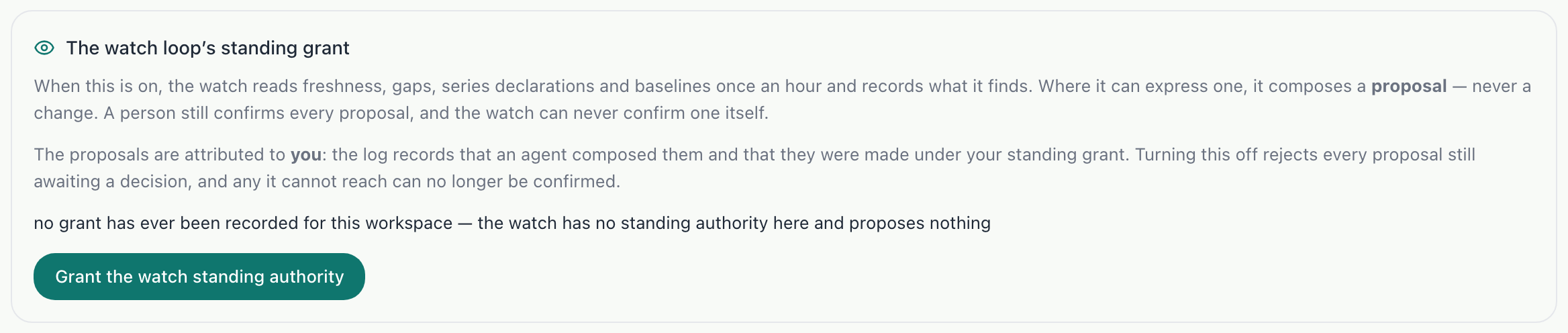
Step 2: Choose whether it is emailed
On the Notifications tab, Daily brief email turns the email on or off for the workspace’s admins. The brief appears on Home either way.

Step 3: Read it on Home
Each morning the brief appears on Home under Daily brief. Until the first one is written, it says when to expect it.

What you’ll see
- Each brief covers the day before: energy by building, alerts still open, and anything the watch noticed.
Troubleshooting
- Home says there is no brief yet.
- The first brief is written on the morning after the watch is granted.
- I want the brief but not the email.
- Pause the email under Settings, Notifications; the brief stays on Home.
Last verified against Radr on 28 September 2026. Screenshots show the real product with a simulated estate; every name and reading in them is invented.
Set up an alert rule
Create a rule that alerts you when a building’s energy jumps, passes a level you set or stops reporting, and choose how serious it is and who is told.
Alerts and the daily briefAsk the assistant a question
Ask Radr’s assistant about your buildings in plain language, for example which one used the most energy last week, and read an answer built from your own readings.
Using the assistantChoose who is notified, and when
Set how alerts reach people in Radr: how many are sent, quiet hours, default recipients and escalation, and Slack or Microsoft Teams channels for the whole team.
AdminStuck on a step?
Tell us which guide and which step, and we will help, then fix the guide.